> ## Documentation Index
> Fetch the complete documentation index at: https://mintlify-nick-eng-3707-update-chat-endpoints-to-single-assi.mintlify.site/llms.txt
> Use this file to discover all available pages before exploring further.
# AI ingestion
> Prepare your documentation for LLMs and AI tools
export const PreviewButton = ({children, href}) => {
return
{children}
;
};
Generate optimized formats and provide shortcuts that help users get faster, more accurate responses when using your documentation as context for LLMs and AI tools.
## Contextual menu
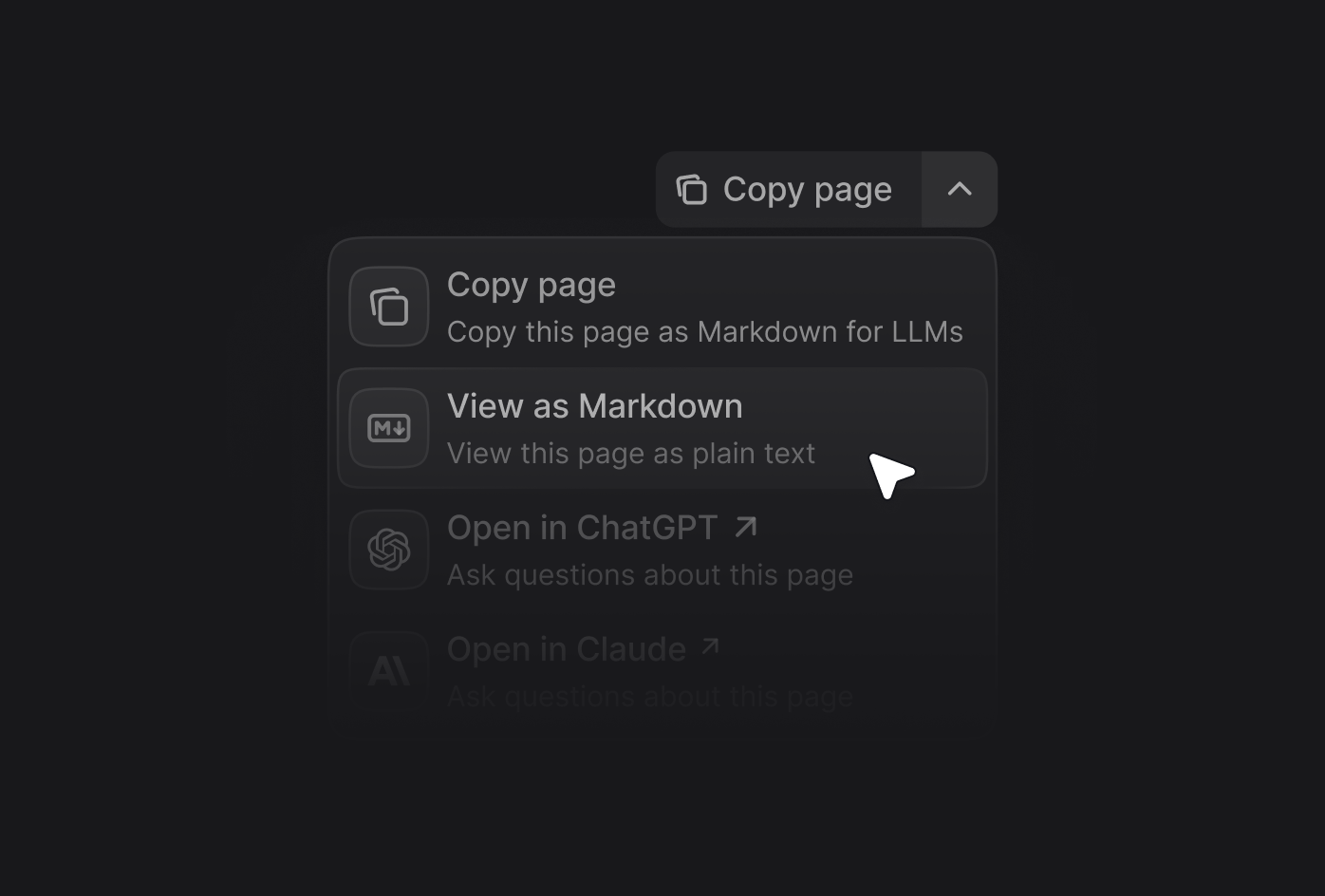
Provide quick access to AI-optimized content and direct integrations with popular AI tools from a contextual menu on your pages.
* **Copy page**: Copies the current page as Markdown for pasting as context into AI tools.
* **View as Markdown**: Opens the current page as Markdown.
* **Open in ChatGPT**: Creates a ChatGPT conversation with the current page as context.
* **Open in Claude**: Creates a Claude conversation with the current page as context.
* **Ask Perplexity**: Creates a Perplexity conversation with the current page as context.
* [**Your custom options**](#adding-custom-options): Add your own options to the contextual menu.
 ### Enabling the contextual menu
Add the `contextual` field to your `docs.json` and specify which options you want to include in your menu.
```json
{
"contextual": {
"options": [
"copy",
"view",
"chatgpt",
"claude",
"perplexity"
]
}
}
```
### Adding custom options
Create custom options in the contextual menu by adding an object to the `options` array. Each custom option requires these properties:
The title of the option.
The description of the option. Displayed beneath the title when the contextual menu is expanded.
The icon of the option. Accepts any icon from the [Icons](/components/icons) collection.
The href of the option. Use a string for simple links or an object for dynamic links with query parameters.
The base URL for the option.
The query parameters for the option.
The query parameter key.
The query parameter value. Use `$page` to insert the current page content in Markdown or `$path` to insert the current page path.
Example custom option:
```json {7-20} Example with Perplexity icon="search"
"contextual": {
"options": [
"copy",
"view",
"chatgpt",
"claude",
{
"title": "Ask Perplexity",
"description": "Ask Perplexity about the current page",
"icon": "search",
"href": {
"base": "https://www.perplexity.ai/search",
"query": [
{
"key": "q",
"value": "Ask question about https://mintlify.com/docs$path.md"
}
]
}
}
]
}
```
## /llms.txt
The [/llms.txt file](https://llmstxt.org) is an industry standard that helps general-purpose LLMs index more efficiently, similar to how a sitemap helps search engines.
Every documentation site automatically hosts an `/llms.txt` file at the root that lists all available pages in your documentation. AI tools can use this file to understand your documentation structure and find relevant content to user prompts.
Open llms.txt for this site
## /llms-full.txt
The `/llms-full.txt` file combines your entire documentation site into a single file as context for AI tools.
Every documentation site automatically hosts an `/llms-full.txt` file at the root.
Open llms-full.txt for this site
## Generating Markdown versions of pages
Markdown provides structured text that AI tools can process more efficiently than HTML, which results in better response times and lower token usage.
### .md extension
Add a `.md` to a page's URL to display a Markdown version of that page.
Open quickstart.md
### Command + C shortcut
Select Command + C (Ctrl + C on Windows) to copy any page as Markdown.
### Enabling the contextual menu
Add the `contextual` field to your `docs.json` and specify which options you want to include in your menu.
```json
{
"contextual": {
"options": [
"copy",
"view",
"chatgpt",
"claude",
"perplexity"
]
}
}
```
### Adding custom options
Create custom options in the contextual menu by adding an object to the `options` array. Each custom option requires these properties:
The title of the option.
The description of the option. Displayed beneath the title when the contextual menu is expanded.
The icon of the option. Accepts any icon from the [Icons](/components/icons) collection.
The href of the option. Use a string for simple links or an object for dynamic links with query parameters.
The base URL for the option.
The query parameters for the option.
The query parameter key.
The query parameter value. Use `$page` to insert the current page content in Markdown or `$path` to insert the current page path.
Example custom option:
```json {7-20} Example with Perplexity icon="search"
"contextual": {
"options": [
"copy",
"view",
"chatgpt",
"claude",
{
"title": "Ask Perplexity",
"description": "Ask Perplexity about the current page",
"icon": "search",
"href": {
"base": "https://www.perplexity.ai/search",
"query": [
{
"key": "q",
"value": "Ask question about https://mintlify.com/docs$path.md"
}
]
}
}
]
}
```
## /llms.txt
The [/llms.txt file](https://llmstxt.org) is an industry standard that helps general-purpose LLMs index more efficiently, similar to how a sitemap helps search engines.
Every documentation site automatically hosts an `/llms.txt` file at the root that lists all available pages in your documentation. AI tools can use this file to understand your documentation structure and find relevant content to user prompts.
Open llms.txt for this site
## /llms-full.txt
The `/llms-full.txt` file combines your entire documentation site into a single file as context for AI tools.
Every documentation site automatically hosts an `/llms-full.txt` file at the root.
Open llms-full.txt for this site
## Generating Markdown versions of pages
Markdown provides structured text that AI tools can process more efficiently than HTML, which results in better response times and lower token usage.
### .md extension
Add a `.md` to a page's URL to display a Markdown version of that page.
Open quickstart.md
### Command + C shortcut
Select Command + C (Ctrl + C on Windows) to copy any page as Markdown.