> ## Documentation Index
> Fetch the complete documentation index at: https://mintlify-nick-eng-3707-update-chat-endpoints-to-single-assi.mintlify.site/llms.txt
> Use this file to discover all available pages before exploring further.
# Global settings
> Configure site-wide settings with the `docs.json` file
The `docs.json` file lets you turn a collection of Markdown files into a navigable, customized documentation site. This required configuration file controls styling, navigation, integrations, and more.
Settings in `docs.json` apply globally to all pages.
## Setting up your `docs.json`
To get started, you only need to specify `theme`, `name`, `colors.primary`, and `navigation`. Other fields are optional and you can add them as your documentation needs grow.
For the best editing experience, include the schema reference at the top of your `docs.json` file. This enables autocomplete, validation, and helpful tooltips in most code editors:
```json
{
"$schema": "https://mintlify.com/docs.json",
"theme": "mint",
"name": "Your Docs",
"colors": {
"primary": "#ff0000"
},
"navigation": {
// Your navigation structure
}
// The rest of your configuration
}
```
## Reference
This section contains the full reference for the `docs.json` file.
### Customization
The layout theme of your site.
One of the following: `mint`, `maple`, `palm`, `willow`, `linden`, `almond`, `aspen`.
See [Themes](themes) for more information.
The name of your project, organization, or product.
The colors to use in your documentation. A primary color is required. For example:
```json
{
"colors": {
"primary": "#ff0000"
}
}
```
The primary color of your theme.
Must be a hex code beginning with `#`.
Light color variant of your theme.
Must be a hex code beginning with `#`.
Dark color variant of your theme.
Must be a hex code beginning with `#`.
Description of your site for SEO and AI indexing.
Your logo for both light and dark mode.
Path pointing to your logo file for light mode. Include the file extension. Example: `/logo.png`
Path pointing to your logo file for dark mode. Include the file extension. Example: `/logo-dark.png`
The URL to redirect to when clicking the logo. If not provided, the logo will link to your homepage. Example: `https://mintlify.com`
Path to your favicon file, including the file extension. Automatically resized to appropriate favicon sizes.
Can be a single file or separate files for light and dark mode. Example: `/favicon.png`
Path to your favicon file for light mode. Include the file extension. Example: `/favicon.png`
Path to your favicon file for dark mode. Include the file extension. Example: `/favicon-dark.png`
Thumbnail customization for social media and page previews.
The visual theme of your thumbnails. If not specified, thumbnails use your site's color scheme defined by the `colors` field.
Background image for your thumbnails. Can be a relative path or absolute URL.
Visual styling configurations.
The style of the page eyebrow. Choose `section` to show the section name or `breadcrumbs` to show the full navigation path. Defaults to `section`.
The theme of the code blocks. Choose `system` to match the site theme or `dark` for always dark code blocks. Defaults to `system`.
Icon library settings.
Icon library to use throughout your documentation. Defaults to `fontawesome`.
You can specify a URL for any individual icon, regardless of the library setting.
Font configuration for your documentation. The default font is [Inter](https://fonts.google.com/specimen/Inter).
Font family, such as "Open Sans", "Playfair Display."
Font weight, such as 400 or 700. Variable fonts support precise weights such as 550.
URL to your font source, such as [https://mintlify-assets.b-cdn.net/fonts/Hubot-Sans.woff2](https://mintlify-assets.b-cdn.net/fonts/Hubot-Sans.woff2). [Google Fonts](https://fonts.google.com) are loaded automatically when you specify a Google Font `family` name, so no source URL is needed.
Font file format.
Override font settings specifically for headings.
Font family, such as "Open Sans", "Playfair Display."
Font weight, such as 400, 700. Variable fonts support precise weights such as 550.
URL to your font source, such as [https://mintlify-assets.b-cdn.net/fonts/Hubot-Sans.woff2](https://mintlify-assets.b-cdn.net/fonts/Hubot-Sans.woff2). [Google Fonts](https://fonts.google.com) are loaded automatically when you specify a Google Font `family` name, so no source URL is needed.
Font file format.
Override font settings specifically for body text.
Font family, such as "Open Sans", "Playfair Display."
Font weight, such as 400, 700. Variable fonts support precise weights such as 550.
URL to your font source, such as [https://mintlify-assets.b-cdn.net/fonts/Hubot-Sans.woff2](https://mintlify-assets.b-cdn.net/fonts/Hubot-Sans.woff2). [Google Fonts](https://fonts.google.com) are loaded automatically when you specify a Google Font `family` name, so no source URL is needed.
Font file format.
Light/dark mode toggle settings.
Default theme mode. Choose `system` to match users' OS settings, or `light` or `dark` to force a specific mode. Defaults to `system`.
Whether to hide the light/dark mode toggle. Defaults to `true`.
Background color and decoration settings.
Background image for your site. Can be a single file or separate files for light and dark mode.
Path to your background image for light mode. Include the file extension. Example: `/background.png`.
Path to your background image for dark mode. Include the file extension. Example: `/background-dark.png`.
Background decoration for your theme.
Custom background colors for light and dark modes.
Background color for light mode.
Must be a hex code beginning with `#`.
Background color for dark mode.
Must be a hex code beginning with `#`.
### Structure
Navigation bar items.
Links to display in the navbar
Text for the link.
URL or path for the link destination.
Icon for the link. Can be a URL (relative or external), Font Awesome icon, or Lucide icon.
Primary button in the navbar.
Button style. Choose `button` for a standard button with a label or `github` for a link to a GitHub repository with icon.
Button text. Only applies when `type` is `button`.
Button destination. Must be a valid path or external URL. If `type` is `github`, must be a GitHub repository URL.
The navigation structure of your content.
Global navigation elements that appear accross all pages and sections.
Language switcher configuration for multi-language sites.
Language code in ISO 639-1 format
Whether this is the default language.
Whether to hide this language option by default.
A valid path or external link to this language version of your documentation.
Version switcher configuration for multi-version sites.
Display name of the version.
Minimum length: 1
Whether this is the default version.
Whether to hide this version option by default.
URL or path to this version of your documentation.
Top-level navigation tabs for organizing major sections.
Display name of the tab.
Minimum length: 1
Icon for the tab. Can be a URL (relative or external), Font Awesome icon, or Lucide icon.
Whether to hide this tab by default.
URL or path for the tab destination.
Anchored links that appear prominently in the sidebar navigation.
Display name of the anchor.
Minimum length: 1
Icon for the anchor. Can be a URL (relative or external), Font Awesome icon, or Lucide icon.
Custom colors for the anchor.
Anchor color for light mode.
Must be a hex code beginning with `#`.
Anchor color for dark mode.
Must be a hex code beginning with `#`.
Whether to hide this anchor by default.
URL or path for the anchor destination.
Dropdown menus for organizing related content.
Display name of the dropdown.
Minimum length: 1
Icon for the dropdown. Can be a URL (relative or external), Font Awesome icon, or Lucide icon.
Whether to hide this dropdown by default.
URL or path for the dropdown destination.
Language switcher for [multi-language](navigation#languages) sites.
Version switcher for sites with multiple [versions](navigation#versions).
Top-level navigation [tabs](navigation#tabs).
Sidebar [anchors](navigation#anchors).
[Dropdowns](navigation#dropdowns) for grouping related content.
[Groups](navigation#groups) for organizing content into sections.
Individual [pages](navigation#pages) that make up your documentation.
Footer content and social media links.
Social media profiles to display in the footer. Each key is a platform name and each value is your profile URL. For example:
```json
{
"x": "https://x.com/mintlify"
}
```
Valid property names: `x`, `website`, `facebook`, `youtube`, `discord`, `slack`, `github`, `linkedin`, `instagram`, `hacker-news`, `medium`, `telegram`, `twitter`, `x-twitter`, `earth-americas`, `bluesky`, `threads`, `reddit`, `podcast`
Links to display in the footer.
Header title for the column.
Minimum length: 1
Links to display in the column.
Link text.
Minimum length: 1
Link destination URL.
Site-wide banner displayed at the top of pages.
The content of the banner. Supports plain text and Markdown formatting. For example:
```json
{
"content": "🚀 Banner is live! [Learn more](mintlify.com)"
}
```
Whether users can dismiss the banner. Defaults to `false`.
Redirects for moved, renamed, or deleted pages.
Source path to redirect from. Example: `/old-page`
Destination path to redirect to. Example: `/new-page`
Whether to use a permanent redirect (301). Defaults to `true`.
Contextual menu for AI-optimized content and integrations.
Actions available in the contextual menu. The first option appears as the default.
* `copy`: Copy the current page as Markdown to the clipboard.
* `view`: View the current page as Markdown in a new tab.
* `chatgpt`: Send the current page content to ChatGPT.
* `claude`: Send the current page content to Claude.
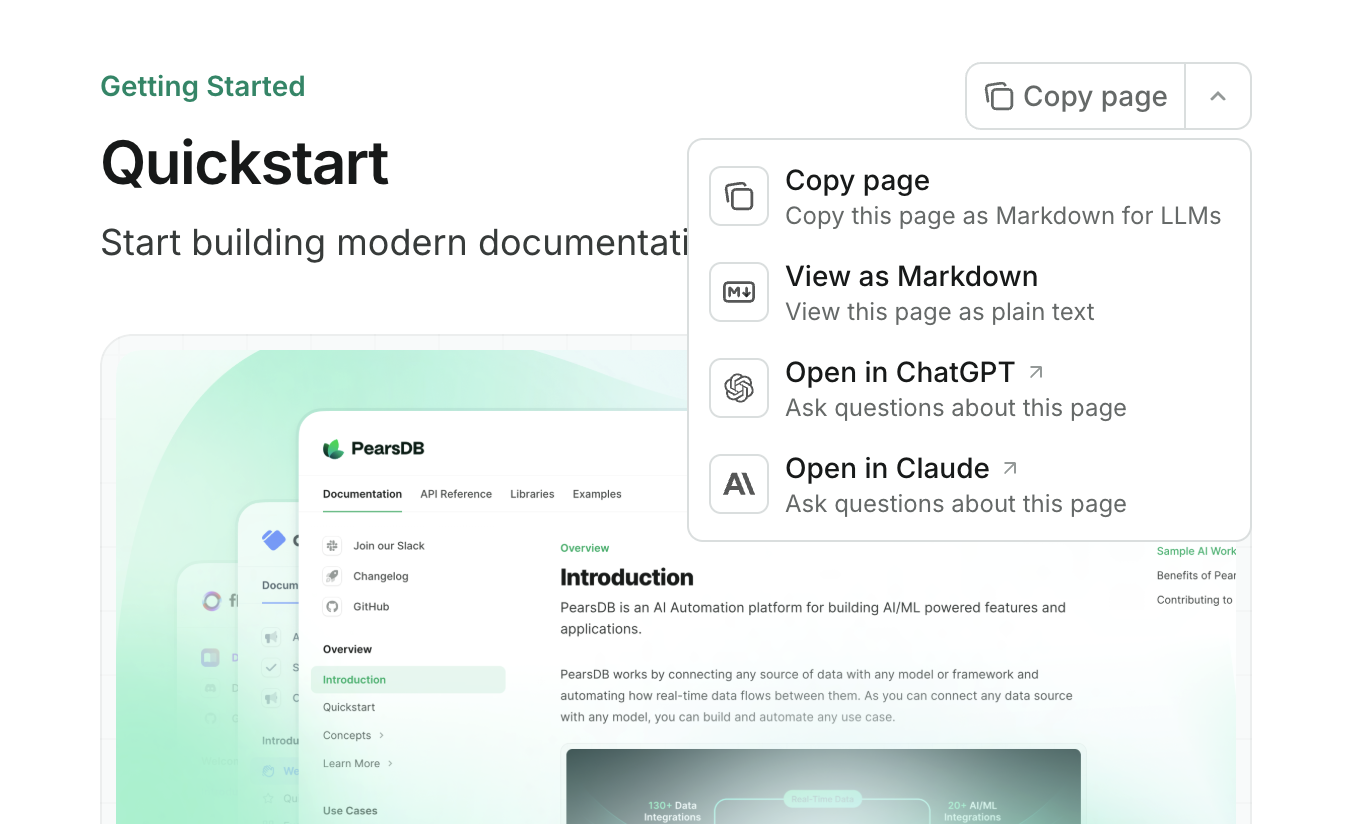 The contextual menu is only available on preview and production deployments.
### API Configurations
API documentation and interactive playground settings.
OpenAPI specification files for generating API documentation. Can be a single URL/path or an array of URLs/paths.
URL or path to your OpenAPI specification file.
Minimum length: 1
Directory to search for OpenAPI files.
Do not include a leading slash.
AsyncAPI specification files for generating API documentation. Can be a single URL/path or an array of URLs/paths.
URL or path to your AsyncAPI specification file.
Minimum length: 1
Directory to search for AsyncAPI files.
Do not include a leading slash.
Display settings for API parameters.
Whether to expand all parameters by default. Defaults to `closed`.
API playground settings.
The display mode of the API playground. Defaults to `interactive`.
Whether to pass API requests through a proxy server. Defaults to `true`.
Configurations for the autogenerated API examples.
Example languages for the autogenerated API snippets
Whether to show optional parameters in API examples. Defaults to `all`.
Configurations for API pages generated from `MDX` files.
Authentication configuration for MDX-based API requests.
Authentication method for API requests.
Authentication name for API requests.
Server configuration for API requests.
### SEO and search
SEO indexing configurations.
Meta tags added to every page. Must be a valid key-value pair. See [common meta tags reference](/settings/seo#common-meta-tags-reference) for options.
Specify which pages search engines should index. Choose `navigable` to index only pages that are in your `docs.json` navigation or choose `all` to index every page. Defaults to `navigable`.
Search display settings.
Placeholder text to display in the search bar.
### Integrations
Third-party integrations.
Amplitude analytics integration.
Your Amplitude API key.
Clearbit data enrichment integration.
Your Clearbit API key.
Fathom analytics integration.
Your Fathom site ID.
Front chat integration.
Your Front chat snippet ID.
Minimum length: 6
Google Analytics 4 integration.
Your Google Analytics 4 measurement ID.
Must match pattern: ^G
Google Tag Manager integration.
Your Google Tag Manager tag ID.
Must match pattern: ^G
Heap analytics integration.
Your Heap app ID.
Hotjar integration.
Your Hotjar ID.
Your Hotjar script version.
Intercom integration.
Your Intercom app ID.
Minimum length: 6
Koala integration.
Your Koala public API key.
Minimum length: 2
LogRocket integration.
Your LogRocket app ID.
Mixpanel integration.
Your Mixpanel project token.
Osano integration.
Your Osano script source.
Pirsch analytics integration.
Your Pirsch ID.
PostHog integration.
Your PostHog API key.
Must match pattern: ^phc\_
Your PostHog API host.
Plausible analytics integration.
Your Plausible domain.
Your Plausible server.
Segment integration.
Your Segment key.
Telemetry settings.
Whether to enable telemetry.
Cookie settings.
Key for cookies.
Value for cookies.
### Errors
Error handling settings.
404 "Page not found" error handling.
Whether to automatically redirect to the home page when a page is not
found.
## Examples
```json title="docs.json" wrap lines
{
"$schema": "https://mintlify.com/docs.json",
"theme": "maple",
"name": "Example Co.",
"description": "Example Co. is a company that provides example content and placeholder text.",
"colors": {
"primary": "#3B82F6",
"light": "#F8FAFC",
"dark": "#0F172A"
},
"navigation": {
"dropdowns": [
{
"dropdown": "Documentation",
"icon": "book",
"description": "How to use the Example Co. product",
"groups": [
{
"group": "Getting started",
"pages": [
"index",
"quickstart"
]
},
{
"group": "Customization",
"pages": [
"settings",
"users",
"features"
]
},
{
"group": "Billing",
"pages": [
"billing/overview",
"billing/payments",
"billing/subscriptions"
]
}
]
},
{
"dropdown": "Changelog",
"icon": "history",
"description": "Updates and changes",
"pages": [
"changelog"
]
}
]
},
"logo": {
"light": "/logo-light.svg",
"dark": "/logo-dark.svg",
"href": "https://example.com"
},
"navbar": {
"links": [
{
"label": "Community",
"href": "https://example.com/community"
}
],
"primary": {
"type": "button",
"label": "Get Started",
"href": "https://example.com/start"
}
},
"footer": {
"socials": {
"x": "https://x.com/example",
"linkedin": "https://www.linkedin.com/company/example",
"github": "https://github.com/example",
"slack": "https://example.com/community"
},
"links": [
{
"header": "Resources",
"items": [
{
"label": "Customers",
"href": "https://example.com/customers"
},
{
"label": "Enterprise",
"href": "https://example.com/enterprise"
},
{
"label": "Request Preview",
"href": "https://example.com/preview"
}
]
},
{
"header": "Company",
"items": [
{
"label": "Careers",
"href": "https://example.com/careers"
},
{
"label": "Blog",
"href": "https://example.com/blog"
},
{
"label": "Privacy Policy",
"href": "https://example.com/legal/privacy"
}
]
}
]
},
"integrations": {
"ga4": {
"measurementId": "G-XXXXXXXXXX"
},
"koala": {
"publicApiKey": "pk_example_key_123"
},
"telemetry": {
"enabled": true
},
"cookies": {
"key": "example_cookie_key",
"value": "example_cookie_value"
}
},
"contextual": {
"options": [
"copy",
"view",
"chatgpt",
"claude"
]
},
"errors": {
"404": {
"redirect": true
}
}
}
```
```json title="docs.json" wrap lines highlight={43-61, 72-79}
{
"$schema": "https://mintlify.com/docs.json",
"theme": "maple",
"name": "Example Co.",
"description": "Example Co. is a company that provides example content and placeholder text.",
"colors": {
"primary": "#3B82F6",
"light": "#F8FAFC",
"dark": "#0F172A"
},
"navigation": {
"dropdowns": [
{
"dropdown": "Documentation",
"icon": "book",
"description": "How to use the Example Co. product",
"groups": [
{
"group": "Getting started",
"pages": [
"index",
"quickstart"
]
},
{
"group": "Customization",
"pages": [
"settings",
"users",
"features"
]
},
{
"group": "Billing",
"pages": [
"billing/overview",
"billing/payments",
"billing/subscriptions"
]
}
]
},
{
"dropdown": "API reference",
"icon": "terminal",
"description": "How to use the Example Co. API",
"groups": [
{
"group": "API reference",
"pages": [
"api-reference/introduction"
]
},
{
"group": "Endpoints",
"openapi": {
"source": "openapi.json"
}
}
]
},
{
"dropdown": "Changelog",
"icon": "history",
"description": "Updates and changes",
"pages": [
"changelog"
]
}
]
},
"api": {
"playground": {
"display": "interactive"
},
"examples": {
"languages": ["javascript", "curl", "python"]
}
},
"logo": {
"light": "/logo-light.svg",
"dark": "/logo-dark.svg",
"href": "https://example.com"
},
"navbar": {
"links": [
{
"label": "Community",
"href": "https://example.com/community"
}
],
"primary": {
"type": "button",
"label": "Get Started",
"href": "https://example.com/start"
}
},
"footer": {
"socials": {
"x": "https://x.com/example",
"linkedin": "https://www.linkedin.com/company/example",
"github": "https://github.com/example",
"slack": "https://example.com/community"
},
"links": [
{
"header": "Resources",
"items": [
{
"label": "Customers",
"href": "https://example.com/customers"
},
{
"label": "Enterprise",
"href": "https://example.com/enterprise"
},
{
"label": "Request Preview",
"href": "https://example.com/preview"
}
]
},
{
"header": "Company",
"items": [
{
"label": "Careers",
"href": "https://example.com/careers"
},
{
"label": "Blog",
"href": "https://example.com/blog"
},
{
"label": "Privacy Policy",
"href": "https://example.com/legal/privacy"
}
]
}
]
},
"integrations": {
"ga4": {
"measurementId": "G-XXXXXXXXXX"
},
"koala": {
"publicApiKey": "pk_example_key_123"
},
"telemetry": {
"enabled": true
},
"cookies": {
"key": "example_cookie_key",
"value": "example_cookie_value"
}
},
"contextual": {
"options": [
"copy",
"view",
"chatgpt",
"claude"
]
},
"errors": {
"404": {
"redirect": true
}
}
}
```
```json title="docs.json" wrap lines
{
"$schema": "https://mintlify.com/docs.json",
"theme": "maple",
"name": "Example Co.",
"description": "Example Co. is a company that provides example content and placeholder text.",
"colors": {
"primary": "#3B82F6",
"light": "#F8FAFC",
"dark": "#0F172A"
},
"navigation": {
"global": {
"anchors": [
{
"anchor": "Documentation",
"href": "https://mintlify.com/docs"
},
{
"anchor": "Changelog",
"href": "https://mintlify.com/docs/changelog"
}
]
},
"languages": [ // [!code highlight:3]
{
"language": "en",
"dropdowns": [
{
"dropdown": "Documentation",
"icon": "book",
"description": "How to use the Example Co. product",
"pages": [
{
"group": "Getting started",
"pages": ["index", "quickstart"]
},
{
"group": "Customization",
"pages": ["settings", "users", "features"]
},
{
"group": "Billing",
"pages": [
"billing/overview",
"billing/payments",
"billing/subscriptions"
]
}
]
},
{
"dropdown": "Changelog",
"icon": "history",
"description": "Updates and changes",
"pages": ["changelog"]
}
]
},
{
"language": "es",// [!code highlight]
"dropdowns": [
{
"dropdown": "Documentación",
"icon": "book",
"description": "Cómo usar el producto de Example Co.",
"pages": [
{
"group": "Comenzando",
"pages": ["es/index", "es/quickstart"]
},
{
"group": "Personalización",
"pages": ["es/settings", "es/users", "es/features"]
},
{
"group": "Billing",
"pages": [
"es/billing/overview",
"es/billing/payments",
"es/billing/subscriptions"
]
}
]
},
{
"dropdown": "Changelog",
"icon": "history",
"description": "Actualizaciones y cambios",
"pages": ["es/changelog"]
}
]
}
]
},
"logo": {
"light": "/logo-light.svg",
"dark": "/logo-dark.svg",
"href": "https://example.com"
},
"navbar": {
"links": [
{
"label": "Community",
"href": "https://example.com/community"
}
],
"primary": {
"type": "button",
"label": "Get Started",
"href": "https://example.com/start"
}
},
"footer": {
"socials": {
"x": "https://x.com/example",
"linkedin": "https://www.linkedin.com/company/example",
"github": "https://github.com/example",
"slack": "https://example.com/community"
},
"links": [
{
"header": "Resources",
"items": [
{
"label": "Customers",
"href": "https://example.com/customers"
},
{
"label": "Enterprise",
"href": "https://example.com/enterprise"
},
{
"label": "Request Preview",
"href": "https://example.com/preview"
}
]
},
{
"header": "Company",
"items": [
{
"label": "Careers",
"href": "https://example.com/careers"
},
{
"label": "Blog",
"href": "https://example.com/blog"
},
{
"label": "Privacy Policy",
"href": "https://example.com/legal/privacy"
}
]
}
]
},
"integrations": {
"ga4": {
"measurementId": "G-XXXXXXXXXX"
},
"koala": {
"publicApiKey": "pk_example_key_123"
},
"telemetry": {
"enabled": true
},
"cookies": {
"key": "example_cookie_key",
"value": "example_cookie_value"
}
},
"contextual": {
"options": ["copy", "view", "chatgpt", "claude"]
},
"errors": {
"404": {
"redirect": true
}
}
}
```
## Upgrading from `mint.json`
If your docs project uses the deprecated `mint.json` file, follow these steps to upgrade to `docs.json`.
If you haven't installed the [CLI](/installation), install it now:
```bash npm
npm i -g mint
```
```bash yarn
yarn global add mint
```
```bash pnpm
pnpm add -g mint
```
If you already have the CLI installed, make sure it is up to date:
```bash
mint update
```
In your docs repository, run:
```bash
mint upgrade
```
This command will create a `docs.json` file from your existing `mint.json`. Review the generated file to ensure all settings are correct.
After verifying your `docs.json` is configured properly, you can safely delete your old `mint.json` file.
The contextual menu is only available on preview and production deployments.
### API Configurations
API documentation and interactive playground settings.
OpenAPI specification files for generating API documentation. Can be a single URL/path or an array of URLs/paths.
URL or path to your OpenAPI specification file.
Minimum length: 1
Directory to search for OpenAPI files.
Do not include a leading slash.
AsyncAPI specification files for generating API documentation. Can be a single URL/path or an array of URLs/paths.
URL or path to your AsyncAPI specification file.
Minimum length: 1
Directory to search for AsyncAPI files.
Do not include a leading slash.
Display settings for API parameters.
Whether to expand all parameters by default. Defaults to `closed`.
API playground settings.
The display mode of the API playground. Defaults to `interactive`.
Whether to pass API requests through a proxy server. Defaults to `true`.
Configurations for the autogenerated API examples.
Example languages for the autogenerated API snippets
Whether to show optional parameters in API examples. Defaults to `all`.
Configurations for API pages generated from `MDX` files.
Authentication configuration for MDX-based API requests.
Authentication method for API requests.
Authentication name for API requests.
Server configuration for API requests.
### SEO and search
SEO indexing configurations.
Meta tags added to every page. Must be a valid key-value pair. See [common meta tags reference](/settings/seo#common-meta-tags-reference) for options.
Specify which pages search engines should index. Choose `navigable` to index only pages that are in your `docs.json` navigation or choose `all` to index every page. Defaults to `navigable`.
Search display settings.
Placeholder text to display in the search bar.
### Integrations
Third-party integrations.
Amplitude analytics integration.
Your Amplitude API key.
Clearbit data enrichment integration.
Your Clearbit API key.
Fathom analytics integration.
Your Fathom site ID.
Front chat integration.
Your Front chat snippet ID.
Minimum length: 6
Google Analytics 4 integration.
Your Google Analytics 4 measurement ID.
Must match pattern: ^G
Google Tag Manager integration.
Your Google Tag Manager tag ID.
Must match pattern: ^G
Heap analytics integration.
Your Heap app ID.
Hotjar integration.
Your Hotjar ID.
Your Hotjar script version.
Intercom integration.
Your Intercom app ID.
Minimum length: 6
Koala integration.
Your Koala public API key.
Minimum length: 2
LogRocket integration.
Your LogRocket app ID.
Mixpanel integration.
Your Mixpanel project token.
Osano integration.
Your Osano script source.
Pirsch analytics integration.
Your Pirsch ID.
PostHog integration.
Your PostHog API key.
Must match pattern: ^phc\_
Your PostHog API host.
Plausible analytics integration.
Your Plausible domain.
Your Plausible server.
Segment integration.
Your Segment key.
Telemetry settings.
Whether to enable telemetry.
Cookie settings.
Key for cookies.
Value for cookies.
### Errors
Error handling settings.
404 "Page not found" error handling.
Whether to automatically redirect to the home page when a page is not
found.
## Examples
```json title="docs.json" wrap lines
{
"$schema": "https://mintlify.com/docs.json",
"theme": "maple",
"name": "Example Co.",
"description": "Example Co. is a company that provides example content and placeholder text.",
"colors": {
"primary": "#3B82F6",
"light": "#F8FAFC",
"dark": "#0F172A"
},
"navigation": {
"dropdowns": [
{
"dropdown": "Documentation",
"icon": "book",
"description": "How to use the Example Co. product",
"groups": [
{
"group": "Getting started",
"pages": [
"index",
"quickstart"
]
},
{
"group": "Customization",
"pages": [
"settings",
"users",
"features"
]
},
{
"group": "Billing",
"pages": [
"billing/overview",
"billing/payments",
"billing/subscriptions"
]
}
]
},
{
"dropdown": "Changelog",
"icon": "history",
"description": "Updates and changes",
"pages": [
"changelog"
]
}
]
},
"logo": {
"light": "/logo-light.svg",
"dark": "/logo-dark.svg",
"href": "https://example.com"
},
"navbar": {
"links": [
{
"label": "Community",
"href": "https://example.com/community"
}
],
"primary": {
"type": "button",
"label": "Get Started",
"href": "https://example.com/start"
}
},
"footer": {
"socials": {
"x": "https://x.com/example",
"linkedin": "https://www.linkedin.com/company/example",
"github": "https://github.com/example",
"slack": "https://example.com/community"
},
"links": [
{
"header": "Resources",
"items": [
{
"label": "Customers",
"href": "https://example.com/customers"
},
{
"label": "Enterprise",
"href": "https://example.com/enterprise"
},
{
"label": "Request Preview",
"href": "https://example.com/preview"
}
]
},
{
"header": "Company",
"items": [
{
"label": "Careers",
"href": "https://example.com/careers"
},
{
"label": "Blog",
"href": "https://example.com/blog"
},
{
"label": "Privacy Policy",
"href": "https://example.com/legal/privacy"
}
]
}
]
},
"integrations": {
"ga4": {
"measurementId": "G-XXXXXXXXXX"
},
"koala": {
"publicApiKey": "pk_example_key_123"
},
"telemetry": {
"enabled": true
},
"cookies": {
"key": "example_cookie_key",
"value": "example_cookie_value"
}
},
"contextual": {
"options": [
"copy",
"view",
"chatgpt",
"claude"
]
},
"errors": {
"404": {
"redirect": true
}
}
}
```
```json title="docs.json" wrap lines highlight={43-61, 72-79}
{
"$schema": "https://mintlify.com/docs.json",
"theme": "maple",
"name": "Example Co.",
"description": "Example Co. is a company that provides example content and placeholder text.",
"colors": {
"primary": "#3B82F6",
"light": "#F8FAFC",
"dark": "#0F172A"
},
"navigation": {
"dropdowns": [
{
"dropdown": "Documentation",
"icon": "book",
"description": "How to use the Example Co. product",
"groups": [
{
"group": "Getting started",
"pages": [
"index",
"quickstart"
]
},
{
"group": "Customization",
"pages": [
"settings",
"users",
"features"
]
},
{
"group": "Billing",
"pages": [
"billing/overview",
"billing/payments",
"billing/subscriptions"
]
}
]
},
{
"dropdown": "API reference",
"icon": "terminal",
"description": "How to use the Example Co. API",
"groups": [
{
"group": "API reference",
"pages": [
"api-reference/introduction"
]
},
{
"group": "Endpoints",
"openapi": {
"source": "openapi.json"
}
}
]
},
{
"dropdown": "Changelog",
"icon": "history",
"description": "Updates and changes",
"pages": [
"changelog"
]
}
]
},
"api": {
"playground": {
"display": "interactive"
},
"examples": {
"languages": ["javascript", "curl", "python"]
}
},
"logo": {
"light": "/logo-light.svg",
"dark": "/logo-dark.svg",
"href": "https://example.com"
},
"navbar": {
"links": [
{
"label": "Community",
"href": "https://example.com/community"
}
],
"primary": {
"type": "button",
"label": "Get Started",
"href": "https://example.com/start"
}
},
"footer": {
"socials": {
"x": "https://x.com/example",
"linkedin": "https://www.linkedin.com/company/example",
"github": "https://github.com/example",
"slack": "https://example.com/community"
},
"links": [
{
"header": "Resources",
"items": [
{
"label": "Customers",
"href": "https://example.com/customers"
},
{
"label": "Enterprise",
"href": "https://example.com/enterprise"
},
{
"label": "Request Preview",
"href": "https://example.com/preview"
}
]
},
{
"header": "Company",
"items": [
{
"label": "Careers",
"href": "https://example.com/careers"
},
{
"label": "Blog",
"href": "https://example.com/blog"
},
{
"label": "Privacy Policy",
"href": "https://example.com/legal/privacy"
}
]
}
]
},
"integrations": {
"ga4": {
"measurementId": "G-XXXXXXXXXX"
},
"koala": {
"publicApiKey": "pk_example_key_123"
},
"telemetry": {
"enabled": true
},
"cookies": {
"key": "example_cookie_key",
"value": "example_cookie_value"
}
},
"contextual": {
"options": [
"copy",
"view",
"chatgpt",
"claude"
]
},
"errors": {
"404": {
"redirect": true
}
}
}
```
```json title="docs.json" wrap lines
{
"$schema": "https://mintlify.com/docs.json",
"theme": "maple",
"name": "Example Co.",
"description": "Example Co. is a company that provides example content and placeholder text.",
"colors": {
"primary": "#3B82F6",
"light": "#F8FAFC",
"dark": "#0F172A"
},
"navigation": {
"global": {
"anchors": [
{
"anchor": "Documentation",
"href": "https://mintlify.com/docs"
},
{
"anchor": "Changelog",
"href": "https://mintlify.com/docs/changelog"
}
]
},
"languages": [ // [!code highlight:3]
{
"language": "en",
"dropdowns": [
{
"dropdown": "Documentation",
"icon": "book",
"description": "How to use the Example Co. product",
"pages": [
{
"group": "Getting started",
"pages": ["index", "quickstart"]
},
{
"group": "Customization",
"pages": ["settings", "users", "features"]
},
{
"group": "Billing",
"pages": [
"billing/overview",
"billing/payments",
"billing/subscriptions"
]
}
]
},
{
"dropdown": "Changelog",
"icon": "history",
"description": "Updates and changes",
"pages": ["changelog"]
}
]
},
{
"language": "es",// [!code highlight]
"dropdowns": [
{
"dropdown": "Documentación",
"icon": "book",
"description": "Cómo usar el producto de Example Co.",
"pages": [
{
"group": "Comenzando",
"pages": ["es/index", "es/quickstart"]
},
{
"group": "Personalización",
"pages": ["es/settings", "es/users", "es/features"]
},
{
"group": "Billing",
"pages": [
"es/billing/overview",
"es/billing/payments",
"es/billing/subscriptions"
]
}
]
},
{
"dropdown": "Changelog",
"icon": "history",
"description": "Actualizaciones y cambios",
"pages": ["es/changelog"]
}
]
}
]
},
"logo": {
"light": "/logo-light.svg",
"dark": "/logo-dark.svg",
"href": "https://example.com"
},
"navbar": {
"links": [
{
"label": "Community",
"href": "https://example.com/community"
}
],
"primary": {
"type": "button",
"label": "Get Started",
"href": "https://example.com/start"
}
},
"footer": {
"socials": {
"x": "https://x.com/example",
"linkedin": "https://www.linkedin.com/company/example",
"github": "https://github.com/example",
"slack": "https://example.com/community"
},
"links": [
{
"header": "Resources",
"items": [
{
"label": "Customers",
"href": "https://example.com/customers"
},
{
"label": "Enterprise",
"href": "https://example.com/enterprise"
},
{
"label": "Request Preview",
"href": "https://example.com/preview"
}
]
},
{
"header": "Company",
"items": [
{
"label": "Careers",
"href": "https://example.com/careers"
},
{
"label": "Blog",
"href": "https://example.com/blog"
},
{
"label": "Privacy Policy",
"href": "https://example.com/legal/privacy"
}
]
}
]
},
"integrations": {
"ga4": {
"measurementId": "G-XXXXXXXXXX"
},
"koala": {
"publicApiKey": "pk_example_key_123"
},
"telemetry": {
"enabled": true
},
"cookies": {
"key": "example_cookie_key",
"value": "example_cookie_value"
}
},
"contextual": {
"options": ["copy", "view", "chatgpt", "claude"]
},
"errors": {
"404": {
"redirect": true
}
}
}
```
## Upgrading from `mint.json`
If your docs project uses the deprecated `mint.json` file, follow these steps to upgrade to `docs.json`.
If you haven't installed the [CLI](/installation), install it now:
```bash npm
npm i -g mint
```
```bash yarn
yarn global add mint
```
```bash pnpm
pnpm add -g mint
```
If you already have the CLI installed, make sure it is up to date:
```bash
mint update
```
In your docs repository, run:
```bash
mint upgrade
```
This command will create a `docs.json` file from your existing `mint.json`. Review the generated file to ensure all settings are correct.
After verifying your `docs.json` is configured properly, you can safely delete your old `mint.json` file.